Read what you should do next
Walk to your driver means you need to reach the displayed meeting point. Wait at pickup, Be ready at pickup or Head to pickup now describe different stages of the vehicle’s approach. Follow the current instruction.
Confirm the meeting place
Check the exact entrance or roadside landmark, not just the general address. Stay on a practical road side. If the pin or approach is unclear, use the available contact option before moving.
Identify the driver and vehicle
When Driver has arrived appears, compare the driver name, vehicle and plate with what is in front of you. Check Your fare and the Wait window. Do not board a different vehicle simply because it is nearby.
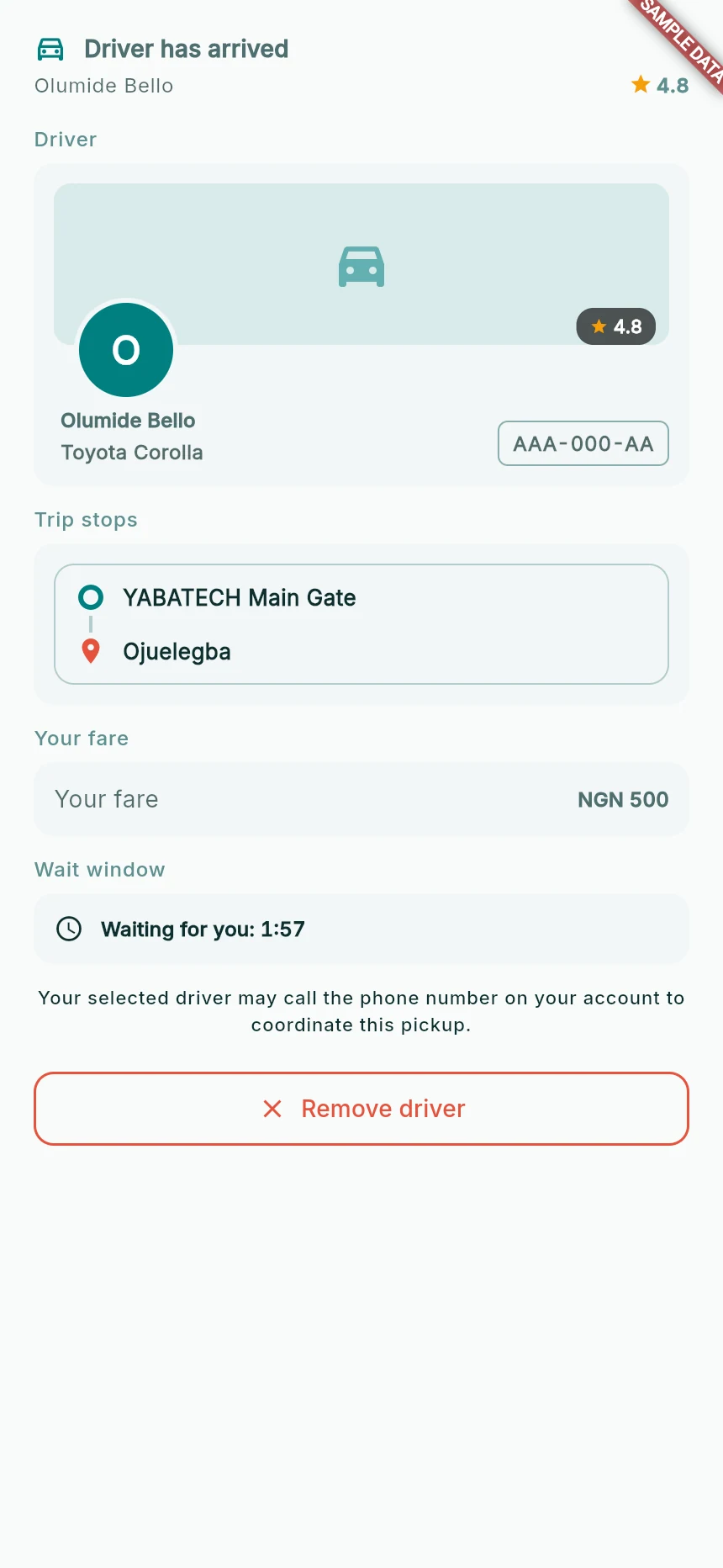
The rider’s arrival panel.
Web app · sample data · Captured 2026-09-25
- 1Compare this identity and plate before boarding.
- 2Check the fare and pickup wait window.
- 3Removing a driver is a separate action from boarding.
Check the boarding transition
Board only after both parties identify the trip. Allow the pickup confirmation to complete and check that the app enters In ride. If it still shows a pending pickup, clarify that before setting off.
How you know it worked
You are in the correct vehicle and the app recognises that the journey has started.
A useful next step
If something goes wrong
The wait window ends
Follow the message to choose another driver or cancel the request. Contacting a driver does not automatically extend the timer.
The driver or plate does not match
Do not board. Use the app’s help/contact option to report the mismatch.
The GPS pin is on the other side of the road
Do not cross unsafely to follow a line. Clarify a usable meeting point with the driver.