Open Payment History
Choose Wallet, then Payment History. Find the relevant date, amount and reference. Check the entry type and status together.
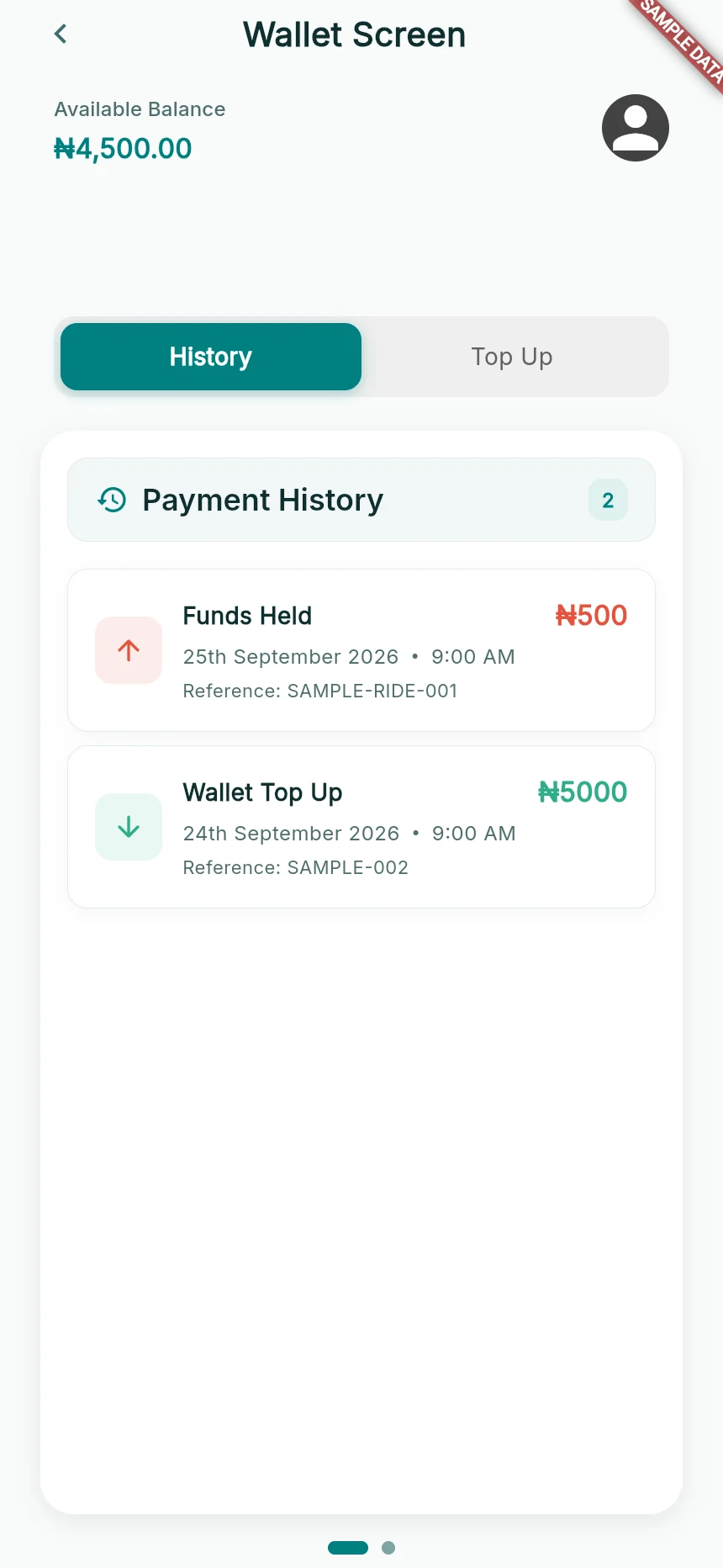
An available balance and two sample ledger entries.
Web app · sample data · Captured 2026-09-25
- 1Available balance is the amount currently usable.
- 2History and Top Up are separate sections.
- 3Entry type and reference explain the financial event.
Understand a hold
Funds Held means money has been set aside for a journey. It is not a second, additional fare. Funds Released records money becoming available again after the relevant outcome.
Separate the other entry types
Ride Payment, Ride Earnings, Service Fee, Wallet Top Up, Ride Refund, Payout and Reversal describe different events. Do not add a hold and its later completed charge as if they were two purchases.
Match the record to the trip
Compare the transaction reference, fare and trip details. Read pending, completed or the actual returned status before deciding the issue is resolved. Trip completion and bank payout are separate events.
How you know it worked
You can identify the transaction that needs attention and explain its current state clearly.
A useful next step
If something goes wrong
A cancelled ride still has a hold
Check for its release entry and available balance. If the hold remains unresolved, contact support with the trip and payment reference.
History will not load
A failed lookup is not evidence that there are no transactions. Retry after reconnecting; preserve the provider receipt.
I do not recognise a charge
Report the exact amount, date and reference. Never send card credentials, an OTP or your bank PIN to support.